

Creating an Interactive Menu in UE5 in the Style of Genshin Impact
Learn how to create an interactive Menu by learning Blueprints, Materials and VFX
-
Chapter 1: Project Setup
-
Chapter 2: Classic UI
-
Chapter 3: Spacial UI
-
Lesson 9: Orb element blueprint creation
-
Lesson 10: Arranging the Orbs around the character
-
Lesson 11: Attaching orbs to an actor to control their movement
-
Lesson 12: Add Orb functionality: Clicking on them and sending information through event dispatchers
-
Lesson 13: Add Orb functionality: Rotating the orbs to the selected one
-
Lesson 14: Orbs - Idle rotation
-
Lesson 15: Orbs - Handling the idle rotation state
-
Lesson 16: Restructoring the functionality to containt complex behavior - Creating the Orb Container class
-
Lesson 17: Orb selection working properly
-
Lesson 18: Creating the sub menu, and opening it through the orbs selection
-
-
Chapter 4: Orb Animation
-
Chapter 5: Background & Orbs VFX
-
Lesson 23: Background VFX Intro
-
Lesson 24: Making the Cloud Texture and Mesh
-
Lesson 25: Making the Background Material
-
Lesson 26: Making the Colored Cloud
-
Lesson 27: Making the Mesh UVs
-
Lesson 28: Making the Front Cloud Material
-
Lesson 29: Fixes & Making the Star Texture
-
Lesson 30: Star Material & Emitter
-
Lesson 31: Last touches on the Background
-
Lesson 32: Making the Ring Texture and Material
-
Lesson 33: Ring noise and Material
-
Lesson 34: Implementing Glow to the Niagara System
-
Lesson 35: Ring Spawn Texture & Material
-
Lesson 36: Making the Flare Texture
-
Lesson 37: Flare Emitter
-
Lesson 38: Making the Flare Stars
-
-
Chapter 6: Styling the Widgets
-
Lesson 39: Analizing our reference for Styling the Buttons
-
Lesson 40: Blocking out our Button
-
Lesson 41: Creating the Button Masks
-
Lesson 42: Animating the arrow
-
Lesson 43: Changing the Text Style
-
Lesson 44: Button Opacity tweaks
-
Lesson 45: Creating the Portrait Textures
-
Lesson 46: Creating the Avatar Material
-
Lesson 47: Creating the Avatar Button
-
Lesson 48: Creating the Avatar Hover Texture
-
Lesson 49: Adding the Hover Button State for Avatars
-
Lesson 50: Changing the Font for Character Menu
-
Lesson 51: Creating the Exit Button Texture
-
Lesson 52: Creating the Exit Button Widget
-
Lesson 53: Adding the Shadow to the Exit Button
-
Lesson 54: Switch Button creation
-
Lesson 55: Creating the Menu Symbol Texture
-
Lesson 56: Menu Symbol Widget
-
Lesson 57: Creating the Extra Menu Button
-
Lesson 58: Extra Menu Widget
-
Lesson 59: Creating the Item Button Texture mask
-
Lesson 60: Testing the First version of the Item color
-
Lesson 61: Painting Icons with fundamentals
-
Lesson 62: Refining the icon values
-
Lesson 63: Coloring our Icon
-
Lesson 64: Importing our UI texture
-
Lesson 65: Creating the Item Widget
-
Lesson 66: Fixing our Widget size
-
Lesson 67: Adding Text to the Item
-
Lesson 68: Using Grid Canvas to organize elements
-
Lesson 69: Polishing the Avatar Background Texture
-
Lesson 70: Creating the avatar image for items
-
Lesson 71: Creating the Star Texture
-
Lesson 72: Changing the Item Widget size
-
Lesson 73: Importing High resolution Item Texture
-
Lesson 74: Adding our Widget to the Orb Blueprint
-
Lesson 75: Fixing the Orb Icon Rotation
-
-
Chapter 7: Polishing
-
Lesson 76: Start the polish pass
-
Lesson 77. Removing the orbs debug number
-
Lesson 78: Adding the Anime Girl Character
-
Lesson 79: Fixing the lightning for the menu
-
Lesson 80: Added return to main menu button logic and fixed menu bug hidding the artifacts list
-
Lesson 81: Added menu states for a smoother experience
-
Lesson 82: Polishing the camera after returning from the menu
-
Ever wondered what AAA games have that yours not?
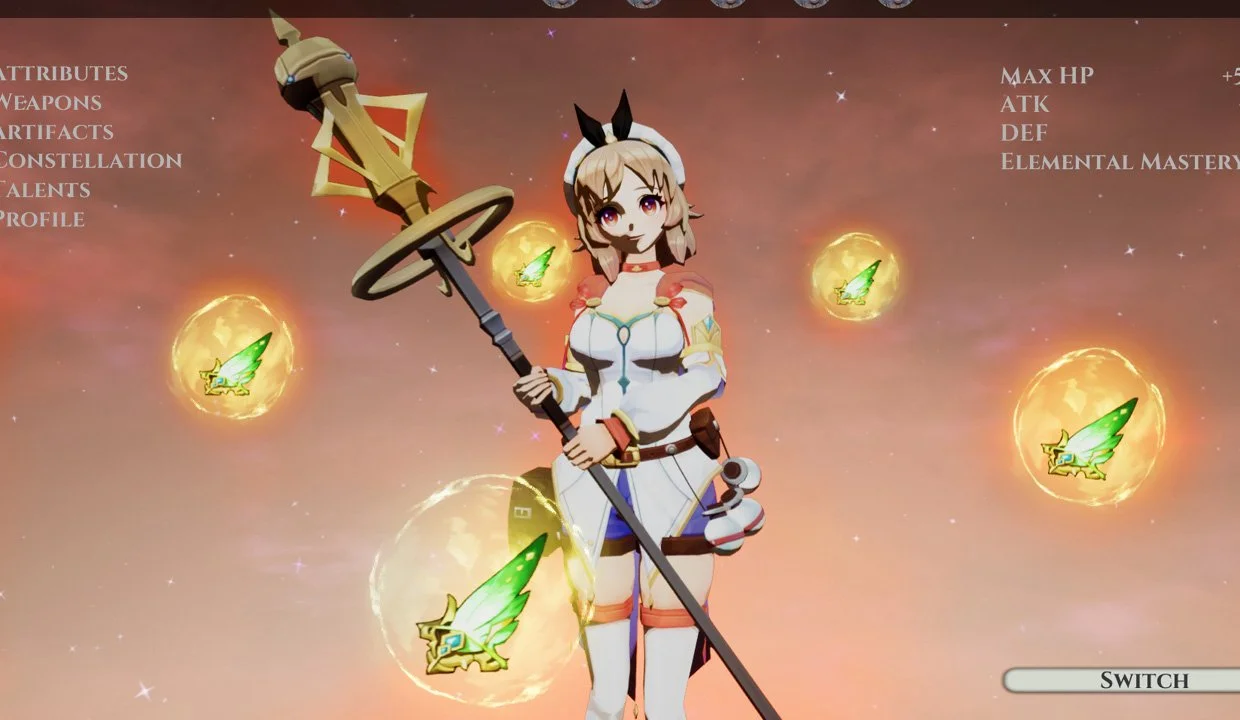
In this course, you will learn how to create a complete Game Feature in Unreal Engine 5 using the Style of Genshin Impact.
This course is not about showing you one part of game development, is about showing you the complete picture.
You will learn Blueprints, Niagara, Materials, UI and how to make them work together to create an entire Game Feature.
UI is one of the least overlooked topics on Game Development, and almost all games have one. To make a great UI is all about User Experience, and that can make the difference between someone liking or disliking your game.
Meet your Instructors

Mauriccio Torres
Technical Artist and Generalist
Mauriccio is a professional 3D artist for video games who has worked for Ubisoft, where he contributed to titles like Skull and Bones and Immortal Fenyx Rising - Myths of the Eastern Realm. He is also an Unreal Authorized Instructor for Epic Games.

Guillermo Rossell
VFX Artist
Guillermo is a professional VFX artist working in the video game industry. He started using Unreal Engine 3 in 2012 and is currently working on Sonus Requiem, a Tactical RPG game made in Unreal Engine 5. He is your guy when it comes to making VFX that has the fantasy style.

Ramanand Purizaga
Gameplay Programmer
Ramanand is an Unreal Authorized Instructor by Epic Games. His passion is a mix between coding, gaming and Unreal Engine, where he has spent the last 10 years of his life mastering this craft. He has worked on both big titles and Indie games.

Enroll now and learn how aaa games are made
Get lifetime access to the course.